control panel

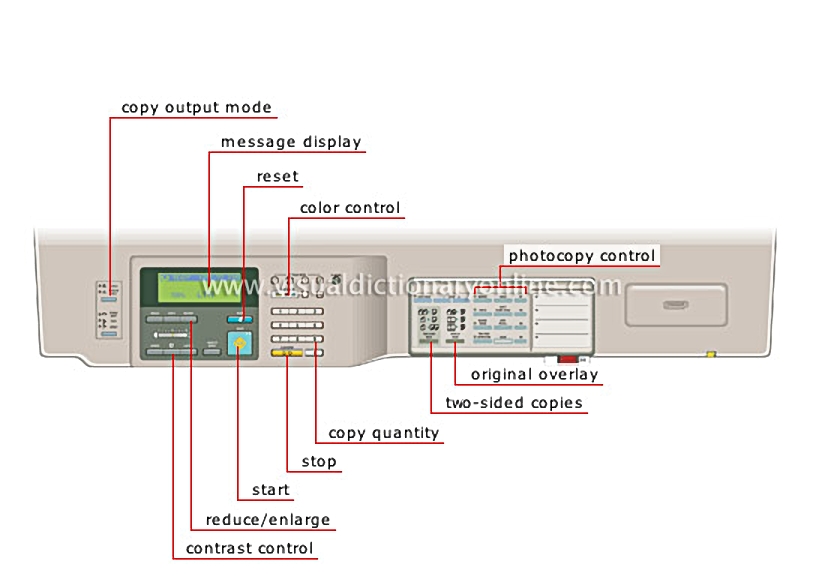
Panel housing the photocopier’s operating buttons.
control panel 						Liquid crystal display that shows a variety of information (equipment settings, operations carried out, instructions or messages).				  							Function used to adjust the reproduction ratio to obtain an enlarged or reduced copy of the original.				  					  							Button used to stop making photocopies or to cancel the number of copies shown on the display screen.				  							Button used to begin making one or several photocopies based on the selected settings.				  							Function that adjusts the degree of darkness (density) of a photocopy automatically or manually.				  							Function that combines two original documents into one photocopy.				  							Button that chooses between one-sided printing (front only) and two-sided printing (front and back).				  							The buttons used to change certain photocopying characteristics (e.g., creating a white border or a margin).				  							Button that selects the color of the photocopy.				  							Button used to cancel all selected settings and return to the default settings.				  							Function that selects how copies will be handled as they come out of the photocopier (including sorting, stapling and folding).
message display

Liquid crystal display that shows a variety of information (equipment settings, operations carried out, instructions or messages).

reduce/enlarge

Function used to adjust the reproduction ratio to obtain an enlarged or reduced copy of the original.

copy quantity

stop

Button used to stop making photocopies or to cancel the number of copies shown on the display screen.

start

Button used to begin making one or several photocopies based on the selected settings.

contrast control

Function that adjusts the degree of darkness (density) of a photocopy automatically or manually.

original overlay

Function that combines two original documents into one photocopy.

two-sided copies

Button that chooses between one-sided printing (front only) and two-sided printing (front and back).

photocopy control

The buttons used to change certain photocopying characteristics (e.g., creating a white border or a margin).

color control

Button that selects the color of the photocopy.

reset

Button used to cancel all selected settings and return to the default settings.

copy output mode

Function that selects how copies will be handled as they come out of the photocopier (including sorting, stapling and folding).